

Most people assume SaaS platforms are built for companies with IT departments, dev teams, and six-figure software budgets. That assumption is costing solo founders real money and time. The truth is, SaaS tools were practically made for the way solopreneurs operate: lean, fast-moving, and allergic to unnecessary overhead. Whether you run a content studio, a coaching practice, or a one-person agency, understanding how to pick and stack the right SaaS tools can be the difference between grinding through your week and actually running a business that works for you.
Table of Contents
- Understanding SaaS: What it means for solopreneurs
- Why SaaS is a solo founder's secret weapon
- Essential SaaS tools for solopreneurs: Categories and examples
- All-in-one vs. modular SaaS: Which approach is right for you?
- What most SaaS success stories miss: The power (and risk) of going solo
- Unlock the full power of SaaS with the right partner
- Frequently asked questions
Key Takeaways
| Point | Details |
|---|---|
| SaaS removes tech headaches | Software as a Service lets you access tools online without IT hassles or big upfront costs. |
| Boost efficiency with automation | SaaS integrates and automates your routine business tasks, freeing up your time for growth. |
| Choose your stack wisely | Both all-in-one and modular SaaS have pros and cons—match your tech to your current business stage and future needs. |
| Stay flexible | Always review your SaaS tools periodically so you don’t get stuck if your business or the software changes. |
Understanding SaaS: What it means for solopreneurs
Let's clear up the basics first, because a lot of solopreneurs either overcomplicate this or skip it entirely.
SaaS (Software as a Service) delivers software over the internet, accessed through a browser, typically with a monthly subscription rather than a one-time local installation. You don't download anything. You don't maintain servers. You log in, and the software is just there, ready to use from any device with an internet connection.
This is a massive shift from the old model. Traditional software required you to buy a license, install it on a specific machine, manually update it, and pray it didn't break when your operating system upgraded. For a solo founder, that model was a nightmare. You were essentially acting as your own IT department while also trying to run a business.
SaaS flips that entirely. Here's what that means in practice for solopreneurs:
- No upfront investment. Most SaaS tools offer monthly plans, so you can start small and cancel if the tool doesn't fit.
- Automatic updates. The provider handles all software updates and security patches. You wake up to a better product without lifting a finger.
- Remote access. Work from your home office, a coffee shop, or a hotel room. Your tools travel with you.
- Pay-as-you-grow pricing. Start on a free or starter plan and upgrade only when your business demands it.
- No IT management. No servers, no installs, no troubleshooting compatibility issues.
Stat to know: The global SaaS market is projected to exceed $370 billion by 2026, with small businesses and individual operators driving a significant portion of that growth. The shift isn't just corporate. It's personal.
You can browse a curated set of SaaS tool options specifically vetted for solo operators if you want to skip the research phase and go straight to tools that have been personally tested.
The pay-as-you-grow model matters more than most people realize. When you're running a solo business, cash flow is everything. Locking into a $5,000 annual software contract the way enterprise teams do is not a viable option. SaaS gives you the flexibility to test, iterate, and optimize your tech stack without betting the business on a single purchase.
Why SaaS is a solo founder's secret weapon
Here's the real problem most solopreneurs face: you're doing everything. Marketing, sales, client delivery, invoicing, customer support, content creation. The list doesn't stop.

Without the right systems, you end up spending most of your day on tasks that don't actually grow your business. Copying data from one app to another. Chasing invoices manually. Sending the same onboarding email for the hundredth time.
SaaS integration is primarily useful as a way to access "one-person tech stack" capabilities, especially automation and business operations, without managing infrastructure or separate installs. That's the real unlock. You're not just buying software. You're buying back your time.
Workflow automation and SaaS work together so that instead of manually moving data between apps, you connect them to run workflows end-to-end. Think about what that looks like in practice:
- A new client fills out your intake form. Their details automatically populate your CRM.
- A project is marked complete. An invoice is automatically generated and sent.
- Someone subscribes to your email list. A welcome sequence starts without you touching a thing.
These aren't hypothetical scenarios. They're what automation for solo founders looks like when your tools actually talk to each other.
The best part? You don't need to be technical to set this up. Tools like Zapier use visual, drag-and-drop interfaces that let you build these connections in minutes.
Pro Tip: Don't try to automate everything at once. Identify the single most time-consuming repetitive task in your week, automate that first, and then expand. Most solopreneurs who try to overhaul their entire workflow at once end up abandoning the project halfway through.
For a deeper look at connecting SaaS tools into a cohesive system, the Solo Business OS framework walks through exactly how to structure this for a one-person operation. And if you want to see how other solo founders are doing it in the real world, the solo founder workflows section covers practical examples across different business models.
Essential SaaS tools for solopreneurs: Categories and examples
Now that you understand the why, let's get into the what. Building a SaaS stack doesn't mean signing up for every tool you see advertised. It means identifying the categories that matter for your specific business and choosing the best fit within each.
Typical SaaS tool categories for solo founders include invoicing and billing, CRM and contact management, and workflow automation to connect multiple apps. Here's how those categories break down:
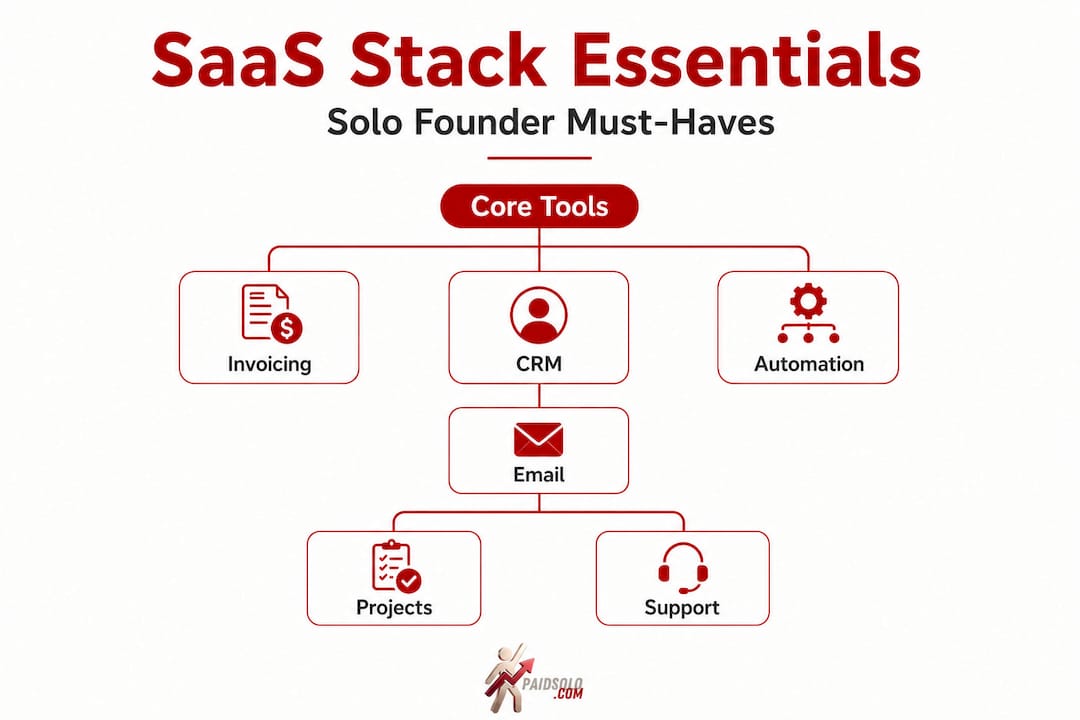
1. Invoicing and billing Tools like Billdu let you create professional invoices, track payments, and send automatic reminders. For solopreneurs who hate chasing money (which is everyone), this category alone can save hours per month.
2. CRM and contact management A CRM (Customer Relationship Management) tool organizes your leads, clients, and follow-up sequences. Options like ClaretCRM and Outseta are built with smaller operations in mind, unlike enterprise CRMs that assume you have a sales team of 20.
3. Workflow automation Zapier sits at the center of most lean SaaS stacks. It connects your other tools so data flows automatically between them. No manual copying, no dropped follow-ups.
4. Email marketing Platforms like Systeme.io, MailerLite, and ConvertKit let you build email lists, run campaigns, and automate sequences. Email remains one of the highest-ROI channels for solopreneurs.
5. Task and project management Tools like Notion, Trello, or Asana help you stay organized without needing a project manager. Many solopreneurs use these to track client deliverables and content calendars.
6. Support and communication Even if you're solo, a lightweight help desk or shared inbox tool keeps client communication organized and professional.
Here's a quick comparison of the core categories:
| Category | Example tools | Primary benefit |
|---|---|---|
| Invoicing and billing | Billdu, Wave | Faster payment collection |
| CRM | ClaretCRM, Outseta | Organized client relationships |
| Automation | Zapier, Make | Connects apps, saves manual work |
| Email marketing | Systeme.io, MailerLite | Scalable audience communication |
| Project management | Notion, Trello | Task and deadline visibility |
You can find a full breakdown of marketing SaaS tools that have been personally tested for solo use cases. And if you want a broader look at marketing tools for solopreneurs, that resource covers the full landscape across paid and free options.
The key is to resist the urge to collect tools. Every tool you add to your stack is another subscription, another login, and another thing to learn. Be intentional. Add tools that solve a real, current problem, not a hypothetical future one.
All-in-one vs. modular SaaS: Which approach is right for you?
This is the question every solopreneur eventually hits. Do you pick one platform that handles everything, or do you build a custom stack by connecting the best individual tools?
Both approaches have real merit, and the right answer depends almost entirely on where you are in your business.
All-in-one SaaS platforms commonly bundle operational functions like billing, CRM, support, and email marketing into one product to reduce context switching across multiple tools. Systeme.io is a strong example. It handles funnels, email marketing, course hosting, and affiliate management under one roof. For someone just getting started, that's genuinely powerful. You don't need to figure out how five tools connect. You just log in and build.
The tradeoff? Depth. All-in-one platforms are built to serve the broadest possible user base, which means they sometimes sacrifice specialized features. If your business has a niche workflow requirement, you may hit a wall.
Modular "best-of-breed" stacks are often recommended when one all-in-one product can't match niche workflows. This is where you pick the best email tool, the best CRM, the best invoicing tool, and connect them with Zapier or Make. You get deeper features and more flexibility, but you also take on more complexity.
Here's a practical breakdown:
| Factor | All-in-one | Modular stack |
|---|---|---|
| Setup time | Fast | Slower |
| Monthly cost | Often lower | Can add up quickly |
| Feature depth | Moderate | High |
| Flexibility | Limited | Very high |
| Best for | Early-stage solopreneurs | Growing, specialized businesses |
Pro Tip: Match your tool choice to your current business phase. If you're under $5K per month in revenue, an all-in-one platform is almost always the right call. Once you're scaling and your workflow has specific demands that your current tools can't meet, that's when you start swapping in specialized tools.
One important warning: watch for operational coupling. That's when a single platform controls so many of your business functions that switching becomes painful. This is a real risk with all-in-one tools. If the platform raises prices, changes features, or goes down, your entire operation is affected. Building toward a solopreneur OS that balances convenience with resilience is the smarter long-term play.
For a deeper look at automation growth guides and how to scale your stack without creating chaos, that resource covers the growth phase in detail.
What most SaaS success stories miss: The power (and risk) of going solo
Every SaaS guide you'll find online makes it sound straightforward. Pick your tools, connect them, automate everything, and watch your business run itself. That's not the full picture.
The real challenge isn't finding the right tools. It's matching those tools to how you actually work, not how you think you should work. I've seen solopreneurs spend weeks building elaborate automation workflows they never actually use because the system was designed around an idealized workflow rather than their real one.
True efficiency comes from honest self-assessment. Before you add any tool to your stack, ask yourself: what is the actual bottleneck right now? Not the theoretical bottleneck. The one that cost you time or money this week.
Tool consolidation can save time, but you still need to watch for integration coverage and operational coupling, especially when one platform controls multiple business functions. This is the risk nobody talks about. When you centralize too much into one platform, you create a single point of failure. If that platform has an outage, changes its API, or gets acquired and pivots, you're scrambling.
The solution isn't to avoid all-in-one tools. It's to stay aware. Do a stack audit every quarter. Ask yourself: Is this tool still the best fit? Is there a better option at the same price? Am I actually using all the features I'm paying for?
You can read about real-world SaaS lessons from building an actual solo business, including the mistakes that don't make it into the polished success stories.
The solopreneurs who build durable, scalable operations aren't the ones with the most sophisticated stacks. They're the ones who stay honest about what's working, stay willing to swap tools when something better comes along, and never let their tech stack become more complex than their business actually needs.
Unlock the full power of SaaS with the right partner
Building a SaaS stack from scratch takes time, research, and a lot of trial and error. Most solopreneurs don't have unlimited hours to test every tool on the market, and that's exactly where having a trusted, vetted resource makes a real difference.
At PaidSolo, every tool recommendation comes from personal testing, not sponsored placements. If a tool makes the list, it's because it genuinely works for solo operators. The PaidSolo tools overview covers the top SaaS picks across every major category, from email marketing and automation to content creation and AI integrations. And if you want a done-for-you framework for structuring your entire operation, the Solo Business OS gives you a complete system designed specifically for one-person businesses. Stop guessing and start building with tools that have already been proven to work.
Frequently asked questions
How does SaaS save solopreneurs time?
SaaS automates recurring tasks like invoicing, scheduling, and client onboarding, eliminating repetitive manual work and freeing up hours each week for revenue-generating activities.
Is it better to choose all-in-one SaaS or individual tools?
All-in-one platforms offer convenience for early-stage solo businesses, while modular stacks provide flexibility and deeper specialized features once your workflow has specific niche requirements that a bundled tool can't meet.
What's the risk of relying on a single SaaS platform?
If your provider changes features, raises prices, or experiences outages, your entire operation can be disrupted. You need to watch for operational coupling and conduct regular stack reviews to stay resilient.
How do I know which SaaS tools are right for my business?
Start by identifying your biggest time drain and automate that first. SaaS is most valuable when used to access one-person tech stack capabilities that match your real workflow, not your ideal one.